
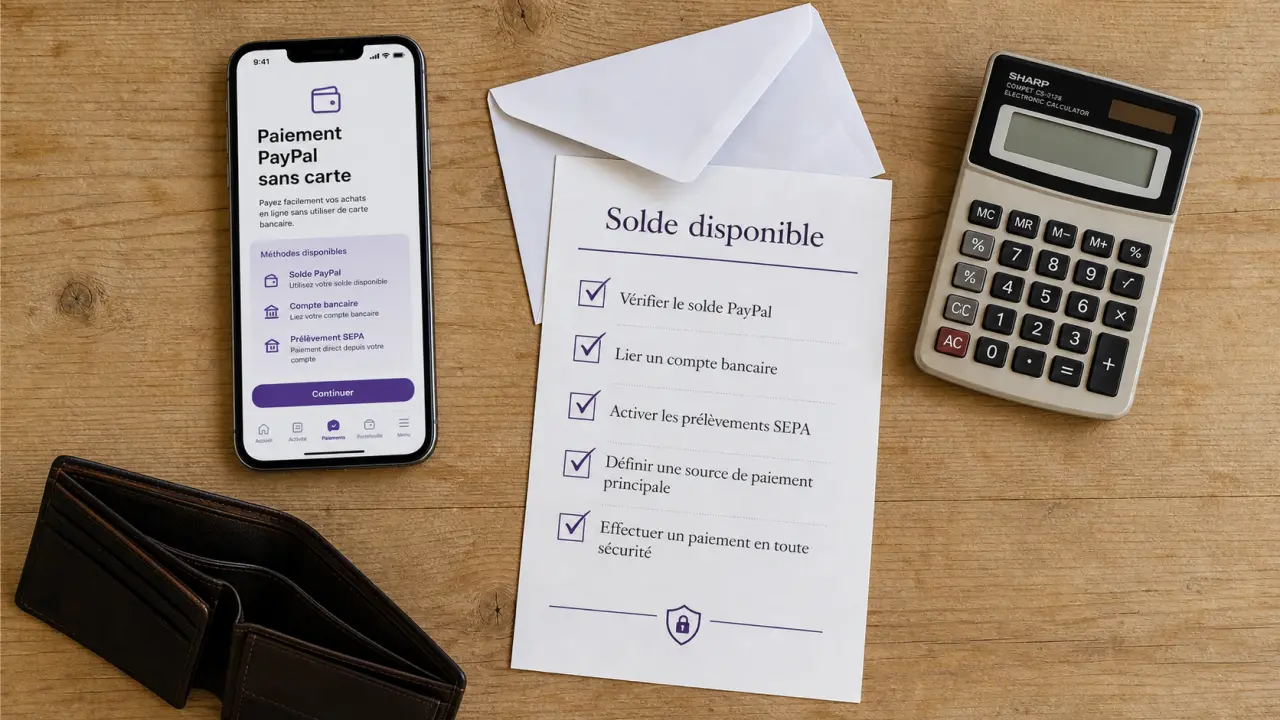
Yes, it is possible to use PayPal without credit card. It then depends on the desired use: create an account, receive money, pay with an already available balance, link a bank account or avoid transmitting its card details to a merchant. The absence of a card does not prevent PayPal from being used, but it may limit certain payments, limits or checks.
What a PayPal account does without a card
A PayPal account can be opened without registering a credit card at the start. Registration is based first on an e-mail address, a password and identity information. The card serves mainly as a source of payment If the PayPal balance is not sufficient, check means or backup solutions.
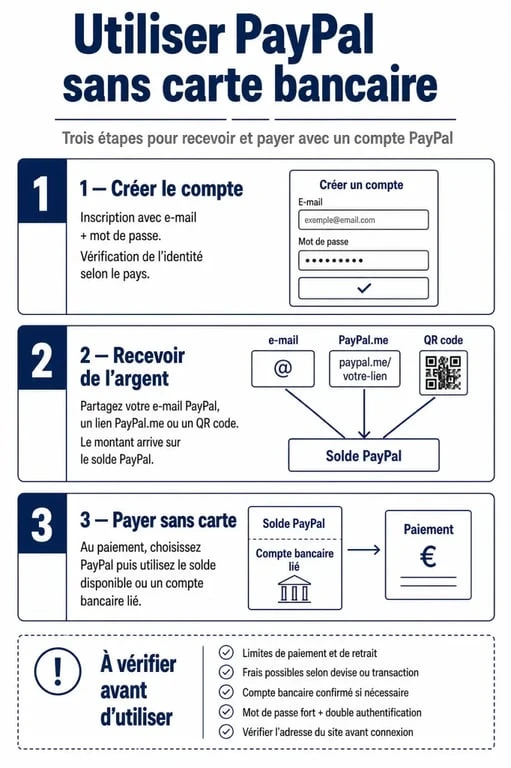
Without a card, you can usually receive money, keep a balance PayPal If this function is available for your account, send money from an existing balance and, in some cases, link a bank account to make transfers. It is a useful solution for people who do not have a card, do not want to use it online or prefer to separate their payments.
Simplest uses without a map
The most comfortable case is where your PayPal account already has a balance. For example, a relative pays you an expense, a client pays a benefit or you receive money via a payment link. You can then use this balance to pay to a merchant who accepts PayPal, without entering a credit card.
You can also receive money via a link PayPal.me, a PayPal QR code or payment request sent from your account. These options are convenient to share fees with friends, collect a small sale between individuals or receive a one-time payment without contacting your contact person.
What Can Get
Some payments may fail if PayPal considers that the account does not have sufficient or sufficiently verified funding. A merchant may also refuse a transaction if the PayPal account is not confirmed, the balance is insufficient or the transaction falls into a more sensitive category. In this case, PayPal may request to add a card, link a bank account or confirm the identity.
Methods to power or use PayPal without credit card
The correct method depends on your situation: do you have a bank account without a card, do you already receive money on PayPal, or are you only looking to pay online without exposing your bank data? Here are the most common options.
| Method | What it allows | Point of vigilance |
|---|---|---|
| PayPal Balance | Pay or send money without card if balance is sufficient | Not all merchants necessarily accept payment according to account profile |
| Related bank account | Finance certain payments or transfer money according to available options | A bank account check may be requested |
| Cash receipt | Create a balance that can then be used to pay or transfer | Fees may apply depending on the type of payment received |
| PayPal.me or QR code | Receive a payment simply, without a card | For use with identified persons and for clear transactions |
| Guest payment via PayPal | Pay on PayPal without PayPal account | This case often requires a credit card, so it is the opposite of the main need |
Link a bank account rather than a card
If you have a bank account but no card, adding a bank account can be an alternative. PayPal may request confirmation to verify that you are the owner. Once this step is completed, some features become more accessible, including transfers between PayPal and your bank account.
This solution is suitable for people who want to receive money on PayPal and then retrieve it from their account, or who want to have a source of financing without a card. However, it does not guarantee that all payments will be accepted everywhere, as PayPal and the merchant keep their own validation rules.
Receive first, pay then
A simple approach is to use PayPal as an intermediate portfolio. You receive money, then you spend only what is available. This avoids attaching a card and limits the risk of unexpected payment, as you cannot commit more than the available balance, except for other associated funding sources.
Think of PayPal as a payment channel rather than an unlimited money reserve. If the input channel is closed, for example because no one has sent you funds or because a transfer is not available, the exit channel to a merchant will also be limited. This logic helps to avoid a frequent error: creating an account without a card thinking that you can pay immediately everywhere. In reality, we have to check the full flow, where the money comes from, where it can come out and what validations are between the two.
Pay, send or receive: concrete steps
To use PayPal without credit card, start by creating your account from the PayPal website or app. Inform your information accurately, confirm your email address, and then explore the options offered in your personal space. If PayPal invites you to add a card, this step can sometimes be ignored, but not always according to the desired use.
PayPal official fees for individuals and traders · See the PayPal reference page on fees, transfers and conditions applicable to private and merchant accounts.
To receive money
The simplest way is to communicate the email address associated with your PayPal account, create a PayPal.me link or present a PayPal QR code if this option is available. Clearly indicate to the sender the nature of the payment: refund between relatives, purchase, benefit or other. This distinction can have an impact on the applicable protections and on possible fresh ones.
Once the money is received, check that it appears in your PayPal balance before using it. Do not rely solely on a screenshot sent by the buyer or an isolated e-mail, log in directly to your PayPal account to confirm receipt.
To pay online
At the time of payment, choose PayPal from the merchant, log in, and then look at which payment source is offered. If your balance is sufficient and accepted, you can validate without a credit card. If PayPal requires a card or other source, payment cannot always be finalized with the balance alone.
This is common on some online services, subscriptions or platforms that want a sustainable source of payment. For a one-time purchase, PayPal balance is enough more often; for a recurring payment, the request for a confirmed card or bank account is more likely.
To send money to a loved one
You can send money from your PayPal balance by telling the e-mail address or the number associated with the recipient's account. Before validating, check the displayed name, amount and type of shipment. A recipient error can be difficult to correct if money is accepted quickly.
Limits, costs and safety to know
Using PayPal without credit card can be convenient, but it's not always as smooth as a fully verified account with multiple payment sources. The most frequent limitations concern the ceilings, identity checks, payments refused by certain merchants and transfer times to a bank account.
Fees depend on the type of transaction: purchase, receipt of a commercial payment, currency conversion, transfer or international shipment. PayPal normally displays useful information before validation. For sensitive or regular transactions, it is better to consult the tariff conditions directly on PayPal website.
- Check your identity If PayPal asks you, this can help remove certain restrictions.
- Keep an adequate balance before paying, especially if you don't have any cards to help.
- Avoid dubious intermediaries which propose to recharge your account against cash or commission.
- Always log in from the app or official website to verify a payment received.
- Enable connection protections, including a strong password and double authentication if available.
PayPal's security depends in particular on the fact that your financial information is not transmitted directly to the merchant. Without a registered credit card, you will reduce the exposure of your card data, but you must remain vigilant about fake emails, fraudulent links and claims outside the platform.
PayPal without card or alternative: in which case choose what?
PayPal remains very popular among online merchants and convenient to receive money quickly. Its main advantage is its wide acceptance and simplicity for payments between individuals or online purchases. On the other hand, if you don't have any card or related bank account, your usage will depend heavily on the funds you receive on your balance.
Alternatives such as Skrill may also be suitable for certain uses, such as transferring money or paying to compatible sites. The right choice depends mainly on the merchants you use, the countries concerned, the fees displayed and the possibilities of withdrawal or feeding without a card.
| Solution | Main advantage | To be checked before use |
|---|---|---|
| PayPal | Well known, often accepted, convenient to pay and receive | Possible restrictions without a confirmed credit card or bank account |
| Skrill | Alternative useful on some sites and for some transfers | Merchant acceptance, fees and withdrawal options |
| Bank transfer | No card needed to transfer money | Time limits, bank details to share, acceptance by seller |
| Prepaid card | Sometimes allows you to pay online without regular credit card | Compatibility with PayPal, fees and terms of issue |
If your priority is to buy on-line without a card, PayPal with an available balance may suffice. If you want to cash regularly, it is best to have an identity check and a reliable method to withdraw or transfer the funds. And if a merchant refuses PayPal without a confirmed source, either add a bank account or choose another payment solution accepted by that merchant.