


From the start of an activity, whether it be a micro-enterprise or a commercial company, the creation of a professional space on the portal impots.gouv.fr is a priority. The dematerialisation of trade with the tax administration is a legal obligation for almost all French companies. Without this access, it is impossible to declare your VAT, to pay your Business Fountain Assessment (BCF) or consult your tax memento.
This approach, although free of charge, can be confusing for new entrepreneurs. Between choosing the access mode, receiving a code by post and security requirements, an error can delay the activation of your services by several weeks. This guide details the procedure for setting up your account without any problems.
Choose the right access mode: Simplified or Expert?
Before entering your Siren number, you must choose between two types of spaces. This choice depends on the structure of your business and the management of your administrative tasks.
Test your knowledge of creating your professional space
Simplified mode for self-employed
The simplified mode is suitable for companies managing their own tax obligations. This is the preferred format for self-entrepreneurs, liberal professions and TPE leaders. It provides access to all services, such as Statements and payments, with only one identifier. Its implementation is quick and does not require any particular technical expertise.
Expert mode for complex structures
The expert mode is for companies that delegate all or part of their tax administration to third parties, such as an accountant. This mode allows fine management of authorizations. You can, for example, allow your accountant to report VAT while maintaining control of the tax account. This mode offers an essential flexibility for SMEs and corporate groups.
The process of creation step by step
The creation of your space takes place in two phases. The first is digital, the second is physical to guarantee the security of your access.
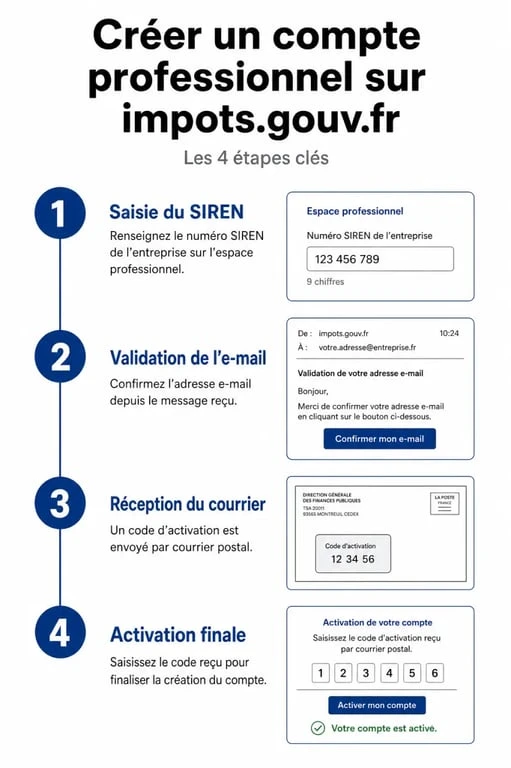
Visit the official website impots.gouv.fr and click the tab « Your professional space », then on « Create my professional space ». You will need to provide the Siren number of your company. If your company has just been registered, a few days is sometimes necessary for SIREN to be recognised by the servers of the Directorate General of Public Finance.
Once the SIREN is validated, provide an email address that will be used to identify and set a password. Administration requires a robust password with a minimum of 20 characters. Use a combination of uppercase, lowercase, digits and special characters to validate this step.
Creating a professional space is the foundation of your relationship with the state. An error in the email address or confusion of SIREN may cause complications when receiving the physical activation code. After validation of the form, you will receive an email containing a activation link. You have 72 hours to click on this link, otherwise the procedure will have to be started again.
Final validation: the importance of postal code
Access to your business tax data requires a physical mail check to ensure that the person creating the space has control of the company's head office.
After validation of the link received by email, the tax administration automatically sends a activation code by simple mail to the address of the company known to the INSEE services. The receipt time varies from 10 to 15 days, but can reach 4 weeks during periods of high influx.
Upon receipt, log in to your space to enter this code. This action unlocks all the features, including the possibility of adding bank accounts for the telepayment.
| Step | Action | Deadline |
|---|---|---|
| Online registration | SIREN input and password | Immediate action |
| Email validation | Click on link (valid 72h) | A few minutes |
| Mail receipt | Receipt of activation code | 10 to 20 days |
| Final activation | Code entry in prospace | Immediate action |
Managing common incidents and errors
Some technical obstacles may hinder your recording. Here is how to respond to frequent situations.
Professional area: manage and pay your taxes online · Access your account to easily pay your local and professional taxes safely.
Message « SIREN unknown »
If your business is new, the SIRENE directory may not yet be synchronized with the tax repository. Wait 48 to 72 hours after receiving your Kbis extract before attempting the operation again. If the problem persists after a week, contact your Business Tax Service (BIS) to verify that no entry error was made during your registration.
Password loss or ID
In case you forget, use the recovery procedure via the « Question of confidence » defined at creation. If you lose access to your professional mailbox, request a complete reset of the account from your EIS. This will lead to the sending of a new code by mail.
Change of bank details
Professional space allows you to manage your SEPA mandates. If you change bank, update your contact information in the section « Manage my bank accounts ». This change requires a validation of a few days before being effective for your next payments.
Essential services accessible after activation
Once your space is operational, you have a complete tax dashboard. The three main tools are:
The secure messaging is the official communication channel. Unlike a conventional email, exchanges have legal value and allow for the safe transmission of sensitive attachments. The Tax account offers a global view of your situation. You can check the history of your payments, your tax notices and check that you are up to date with your obligations. Finally, the management of services enables telereporting options to be activated. Check that services « See the tax account » and « Declare/Pay VAT » are active.
Creating your professional space requires anticipation. Don't delay the process: waiting until the day before a tax deadline to create your account is the best way to expose yourself to late penalties, as long as the postal code arrives at your destination.